 CareCard
Adding Admins and Coordinators
How a Campus Admin adds another Campus Admin or a Program Coordinator from the Institution page.
Within the campuses you administer, you can add two kinds of people:
- Campus Admin — Another admin for one of your campuses.
- Program Coordinator — A coordinator for one program at your campus.
Where the Actions Live
Both actions start from the actions menu (⋯) on the Institution page:
- Add Admin — On a campus's ⋯ menu. This invites a Campus Admin to that campus.
- Add Coordinator — On a program's ⋯ menu. This invites a Program Coordinator to that program.
Send the Invitation
Open the ⋯ menu and select Add Admin or Add Coordinator. The Invite User to Role dialog opens.
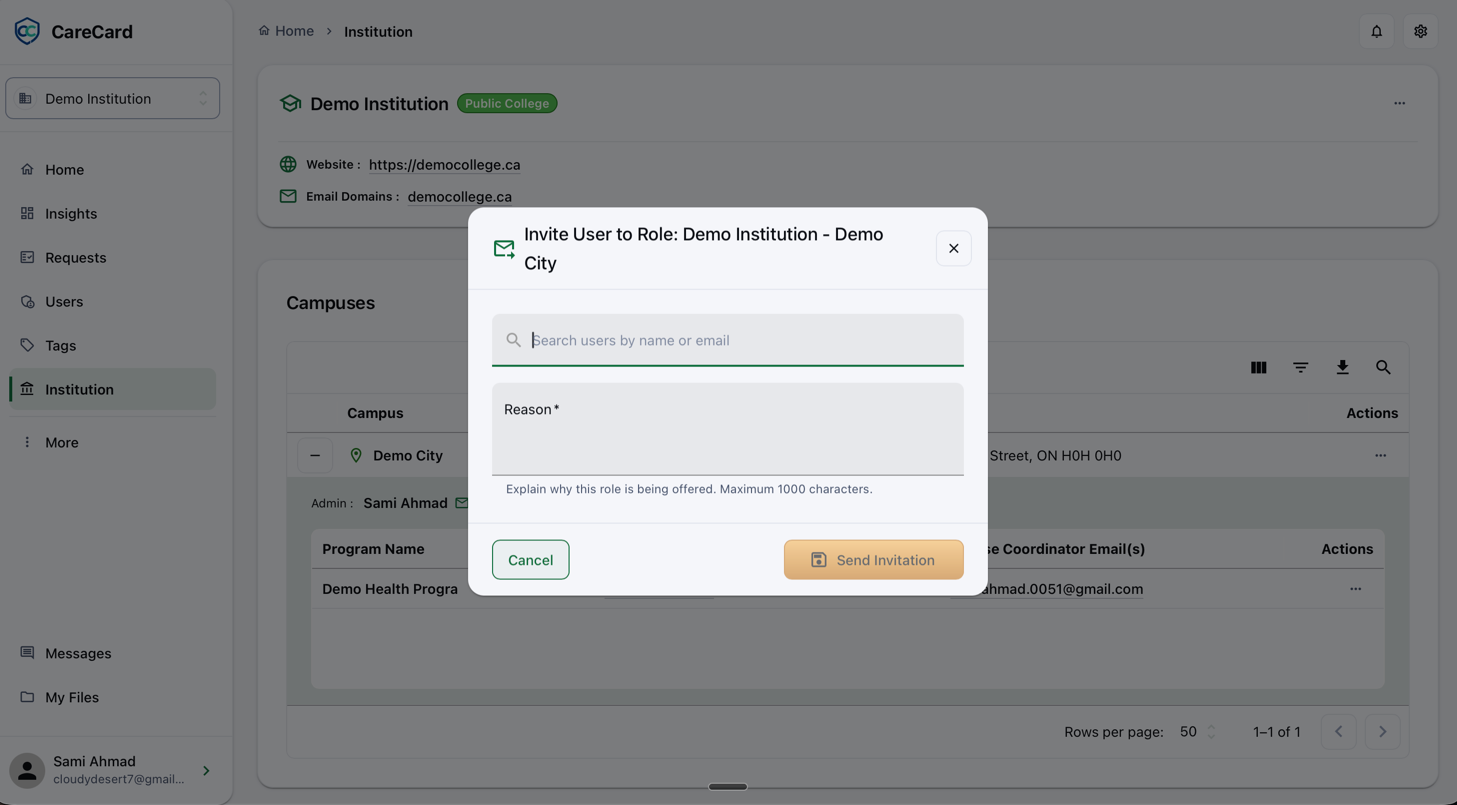
Search for the person by name or email, write a Reason, then select Send Invitation.
When an Expiry Is Required
A Program Coordinator is a lower role than yours, so no expiry is needed — the invitation goes out right away.
Another Campus Admin is the same role as yours. That assignment is temporary, so a Role Assignment Expiry step appears after Send Invitation — pick a Role expiry date (up to one year out) and select Continue. The role ends automatically on that date.
After You Send It
The invitation does not turn on the role on its own. The person finds it under Pending Role Invitations on their Home dashboard. The role turns on only after they accept it.